Wallets
Almanak Wallets are fully on-chain, non-custodial wallets secured by Safe and Zodiac. They allow users to maintain full custody and control of their funds while delegating only the permissions required to execute a strategy to their deployments.
For the full deployment workflow, see Deploy.
Architecture
Almanak Wallets consist of four components:
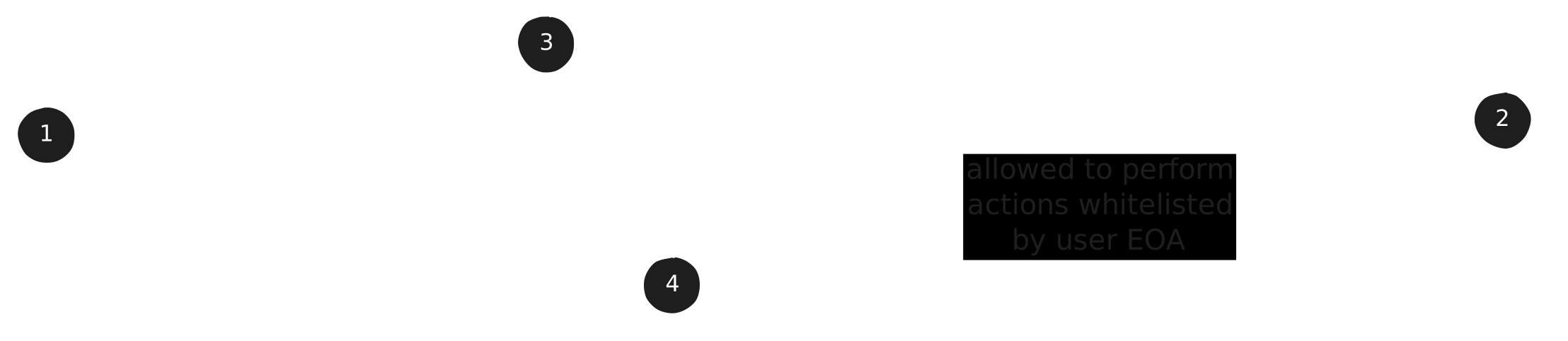
- User Wallet
- Deployment Externally Owned Account (EOA)
- Safe Wallet
- Zodiac Roles Modifier Module
User Wallet
The User Wallet is the wallet users use to sign into the Almanak platform, and is fully owned by the user. This wallet can be either an externally owned account (EOA) or an on-chain smart account (ERC-4337).
The User Wallet is responsible for managing the Safe Wallet, as well as delegating and revoking permissions to the Deployment EOA.
Deployment EOA
The Deployment externally owned account (EOA) is used by Almanak solely as a transaction-execution component within permissions expressly approved by the user; Almanak does not take custody of user assets. Its private key is encrypted at rest and access is restricted through dedicated signer-service controls. The key is used to sign transactions that are being executed by an active strategy.
The Deployment EOA signs and broadcasts transactions for an active strategy and pays the gas required for those execution transactions, subject at all times to the user-approved permission scope.
Safe Wallet
The Safe Wallet is a smart account built on the Safe technology. It is a 1-out-of-1 multisig wallet where the User Wallet is the sole owner, giving users complete control over their funds. The Safe Wallet integrates with the Zodiac Roles Modifier Module to enable permissioned access for Almanak Deployments while maintaining the non-custodial nature of the wallet.
Zodiac Roles Modifier Module
The Zodiac Roles Modifier acts as a permission layer between Almanak Deployments and the Safe Wallet. It enables fine-grained access control through:
- Whitelisting of specific smart contract functions that Deployments can call
- Parameter restrictions on whitelisted functions to limit the scope of permitted actions
- Flexible permission management allowing users to specify any deployed contract
Security
Security of user funds is paramount in the Almanak Platform architecture:
- Deployment EOA private keys are encrypted at rest and can only be accessed by a dedicated signer service
- Key management utilizes enterprise-grade security infrastructure provided by Google
- Direct human access to Deployment EOA private keys is restricted by platform security controls
In the unlikely event of a suspected Deployment EOA compromise:
- Users will be notified immediately through official Almanak communication channels
- Users should promptly revoke any permissions granted to the compromised EOA
- A new Deployment EOA will be generated with fresh permissions
Autonomous Execution Fees
Warning
Autonomous Execution Fees are not refundable.
For your Deployment EOAs to operate and execute transactions on the blockchain, you must purchase the Autonomous Execution Service, which is offered on the Almanak Platform.
How the Service Works:
The Autonomous Execution Service covers all operational costs incurred by the Almanak Platform to power your strategies, including the variable network gas fees.
Users are responsible for ensuring they have an active service package to keep their Deployment EOAs operational. New packages can be purchased at any time through the Almanak Platform UI.
Service fees are non-refundable, as they grant immediate access to the Almanak Platform's execution capabilities.
Service fees are paid in the native token of the blockchain where the Deployment EOA is deployed, or in other currencies as offered on the Almanak Platform.
The service is offered in packages (e.g., for a set number of transactions, or as a time-based subscription). The fee for each package is clearly displayed at the time of purchase.
Applicable taxes, such as VAT, will be added to the service fee.
Future improvements:
The Almanak Platform is developing more efficient service models, including potential cross-chain packages that would allow a single service fee to cover the execution of strategies across multiple blockchains as well as access to other features.
Polymarket Wallets
If you want to run a strategy that trades on Polymarket, you'll need a Polymarket Wallet instead of a regular Almanak Wallet. When you create a wallet on Polygon, toggle the Polymarket addon on — Almanak handles the rest.
When to use one
Enable the addon if your strategy will place orders on Polymarket. For any other Polygon strategy, stick with the regular Almanak Wallet — it works across more protocols and isn't tied to Polymarket.
What's different
You still own the wallet outright, you still hold the keys via your connected wallet, and the same Autonomous Execution Service powers it. From your point of view, the only differences are:
- Polygon only. The addon is only available when creating a wallet on Polygon, since that's the only chain Polymarket runs on.
- Recognised by Polymarket. The wallet is set up so the Polymarket CTF Exchange treats it as a first-class Polymarket account — order entry, fills, and balances all show up the way they would for a wallet created directly on Polymarket.
- Ready to trade out of the box. The permissions a Polymarket strategy needs (USDC approvals, CTF interactions, market actions) are pre-configured at creation, so you can fund the wallet and deploy without an extra setup step.
You can hold and use a regular Almanak Wallet and a Polymarket Wallet on Polygon side by side — pick the one that matches the strategy you're deploying.
Wallets (Legacy)
Info
If you created wallets before the current platform version, they appear under the Wallets (Legacy) tab. Legacy wallets continue to function but use the previous wallet management interface. New deployments should use the current wallet system.